.png)
Why am I being redirected to Shop Pay at checkout?Updated 3 months ago
We’ve recently upgraded our website to Shopify to provide a faster and smoother shopping experience.
Because our store now runs on Shopify, the system may automatically recognise if you have a Shop Pay account. If it does, you may be directed to Shop Pay Express Checkout.
Shop Pay Express Checkout is designed to be a fast and secure way to pay, but you can easily switch to another payment method if you prefer.
How do I choose another payment method?
You can change from Shop Pay to another payment option such as POLi or Afterpay.
How do I switch from Shop Pay to another payment method?
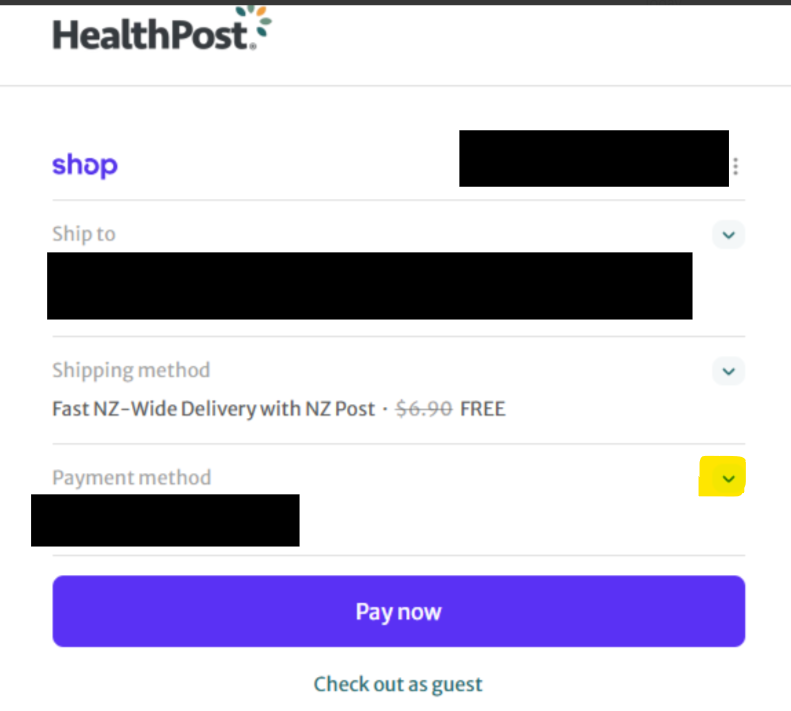
At checkout, look for the dropdown menu next to the payment method in the Shop Pay section.
(your card details saved in Shop Pay will be visible)
- Click on the dropdown arrow
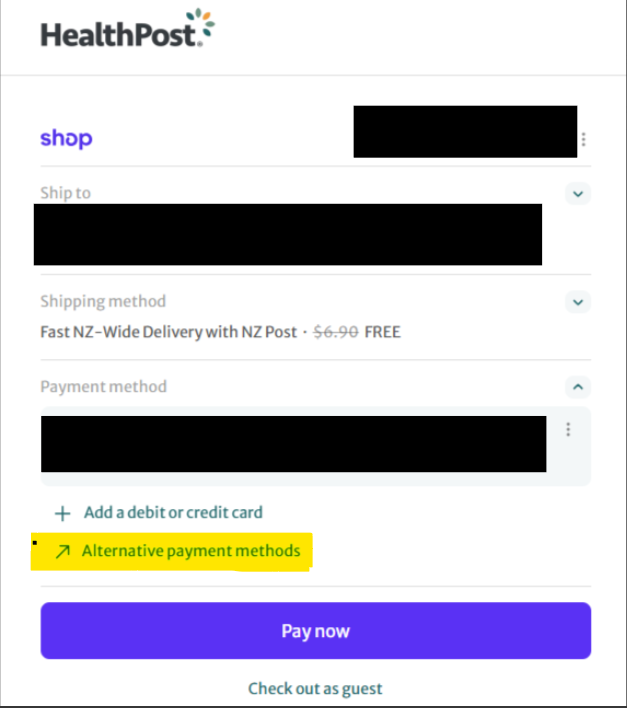
- Select Alternative payment method.
- Enter your shipping details.
- Choose your preferred payment option (e.g. POLi or Afterpay) and complete checkout.
Why does Shop Pay appear automatically?
Shopify recognises customers who have previously used Shop Pay on Shopify stores and offers it as the fastest checkout option.
If you prefer not to use Shop Pay, simply follow the steps above to select a different payment method.