.png)
How do I use the checkout page?Updated 9 days ago
How do I complete my order?
1. Simply add products to your shopping cart and with each item added your shopping cart will be visible.
When you have finished adding to your cart select "CHECK OUT" within the cart.
This will take you to our secure checkout. Here you can sign in or create an account if not done already.
Make sure to check that the following details are correct:
- The products and quantities you are ordering
- Your details
- Your delivery address
2. Do you have any Healthy Rewards?
Use the Healthy rewards selector at checkout to choose how many rewards you'd like to use towards your order
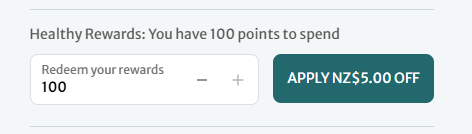
Once you click and apply these to your order a Healthy Rewards voucher code will be automatically applied to your order. Your order total will update, reflecting the applied voucher.
3. If you have a promocode this is added in the "Discount code or gift card" section and click on "Apply"
4. Select or type in your delivery address.
5. Once you're happy with this you can enter your credit card details if paying with credit card
6. Complete Billing address
7. You will now see the remaining payment options or Afterpay, POLi and Paypal
8. If you would like your credit card saved you can create a Shop Pay account for faster checkout with your next order - to create a SHOP account follow the prompt to save to SHOP before selecting PAY NOW. To find out more about Shop Pay click here
9. Click on "Pay now" to complete your order
Have another question? Our friendly customer care team are here to help
Discover 5000+ natural health and wellness products at our online store.